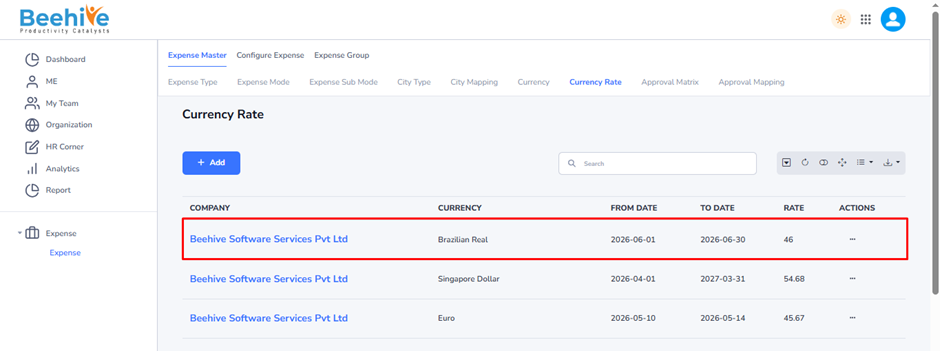
Currency Rate
Currency is the official form of money used by a country or region to conduct financial transactions, purchase goods and services, and settle payments. Each currency is identified by a unique code and symbol, such as INR (₹) for India, USD ($) for the United States, and EUR (€) for the European Union. In business applications like HRMS, payroll, travel, and expense management systems, currencies are used to record transactions made in different countries and to support international operations.
When employees incur expenses in foreign currencies, the system uses currency rates to convert those amounts into the organization’s base currency for reimbursement, accounting, and reporting purposes.
Example –
1 USD = ₹85 INR
– 1 US Dollar equals 85 Indian Rupees.
1 EUR = ₹97 INR
– 1 Euro equals 97 Indian Rupees.
1 GBP = ₹115 INR
– 1 British Pound equals 115 Indian Rupees.
Forrmula –
Converted Amount = Foreign Currency Amount × Currency Rate
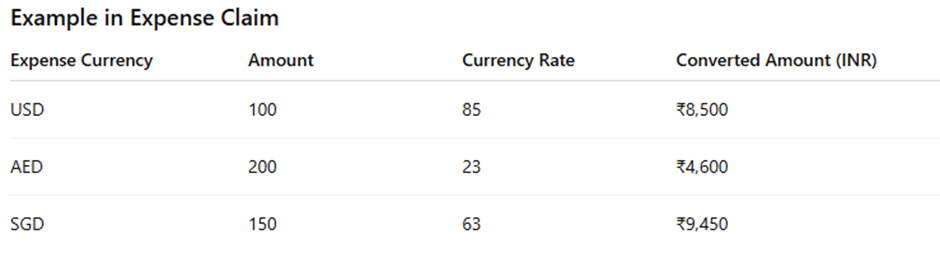
Example –
Expense Amount = 100 USD
Currency Rate = 85 INR
Converted Amount = 100 × 85 = ₹8,500
In HRMS / Expense Management Currency Rate is used to –
– Convert foreign travel expenses into the company’s base currency.
– Calculate reimbursement amounts.
– Process international payroll transactions.
– Generate financial and expense reports in a single currency.
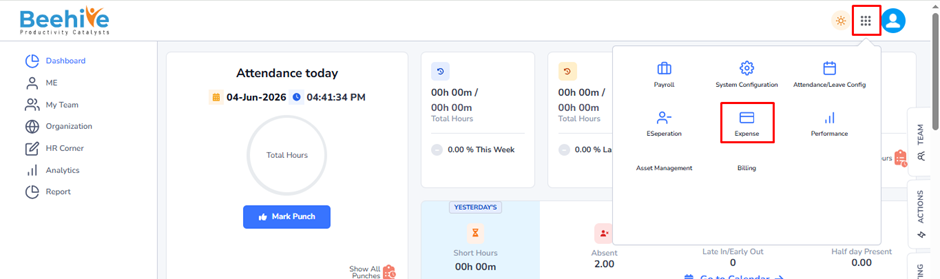
Navigation –
Login -> Module Box-> Expense -> Expense Master -> Currency Rate
Click on Add button and Fill the details.
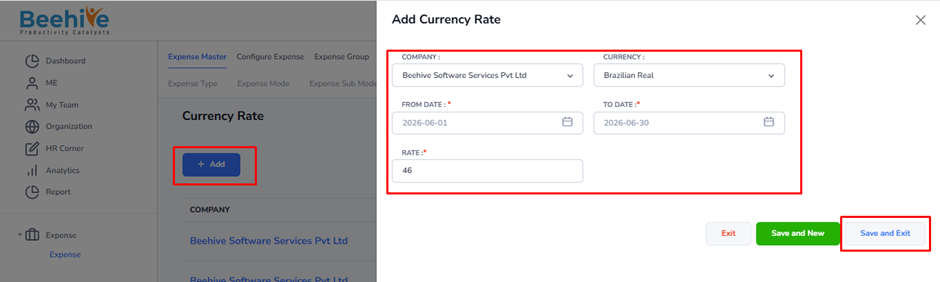
Company: Select the company for which the currency rate is being configured.
Currency: Select the foreign currency whose conversion rate will be maintained.
From Date – Specifies the start date from which the currency rate will be effective.
To Date – Specifies the end date until which the currency rate will remain valid.
Rate – Enter the exchange rate value.
Example –46
Note: The rate generally represents the conversion value between the selected currency and the organization’s base currency.
Created Master will be visible on the Index Page.