
PayHead Master
In Payhead Master, salary components are created and managed. Every payhead must be assigned a Head Type and a Payhead Category.
- i)Allowance: Used for salary earnings paid to employees. Examples: Basic, HRA, Conveyance, Special Allowance.
- ii)Deduction: – Used for amounts deducted from employee salary. Example: – Loan ded, Canteen, other, etc.
- iii)Reimbursement: – Used to reimburse employees against approved bills or claims. Examples: Travel, Medical, Mobile Reimbursement.
Navigation:- Payroll–> Configuration–>Payhead Master
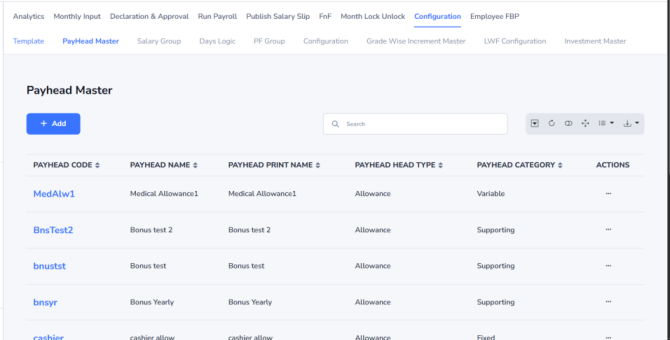
Steps to Add a Payhead:
- Go to Payroll → Configuration → Payhead Master.
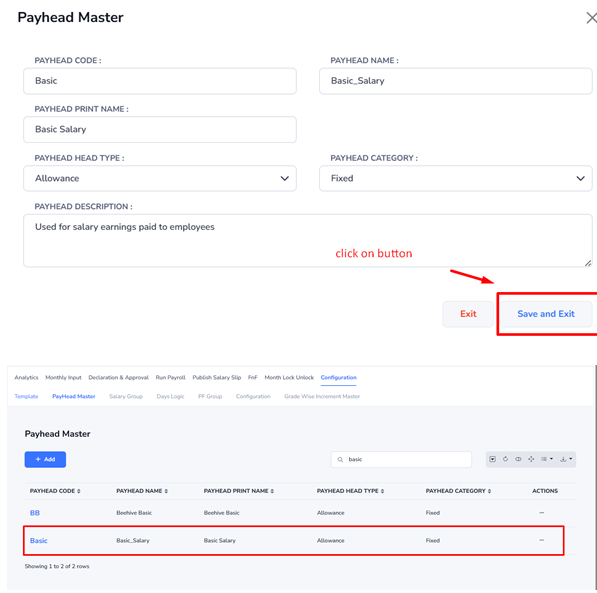
- Click Add New. Enter the Payhead Name. Select the Head Type (Allowance, Deduction, or Reimbursement).
- Select the Payhead Category (System, Fixed, Variable, or Supporting). Enter other required details as applicable.
- Click the Save and Exit button to create the payhead.
Notes:
- Payhead Code – Enter a unique code without any special characters or spaces. For example, do not use spaces (
/,@,#, or other special symbols. - Payhead Name – This name is used as the column/header name in reports.
- Payhead Print Name – This name is displayed in employee-facing documents such as the Salary Slip, Employee CTC Structure, and other payroll-related documents.