
Days Logic
The Days Logic feature is used to define how payroll working days are calculated for employees. The configuration can be applied Branch-wise or Category-wise, depending on your organization’s payroll policy.
Steps to Configure Days Logic
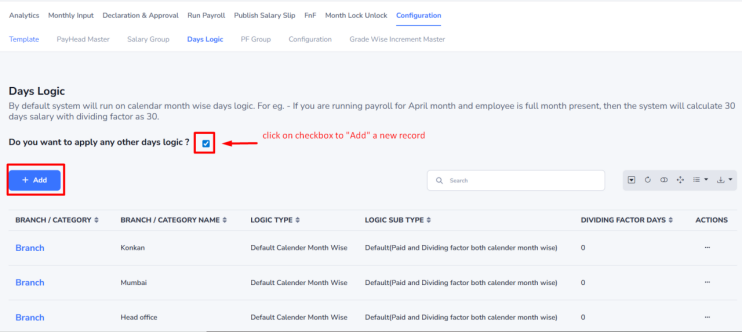
Navigation:- Payroll–> Configuration–>Days Logic
- Go to the Days Logic section.
- Click the Days Logic checkbox to enable a new days calculation setup.
- Select the required Branch or Category for which the logic needs to be applied.
- Choose the appropriate Days Calculation Logic as per your payroll policy.
- Click the Save button to apply the configuration.
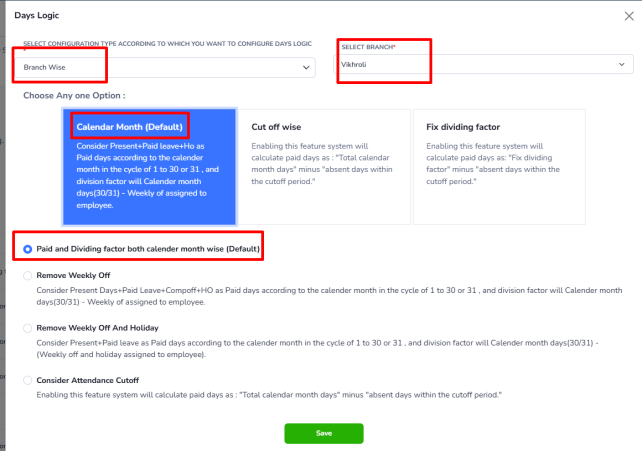
Example: If employees in the Head Office branch are paid based on the total calendar days in a month
- Select Head Office as the Branch.
- Choose Calendar Month-wise as the Days Calculation Logic.
- Click the Save Button.
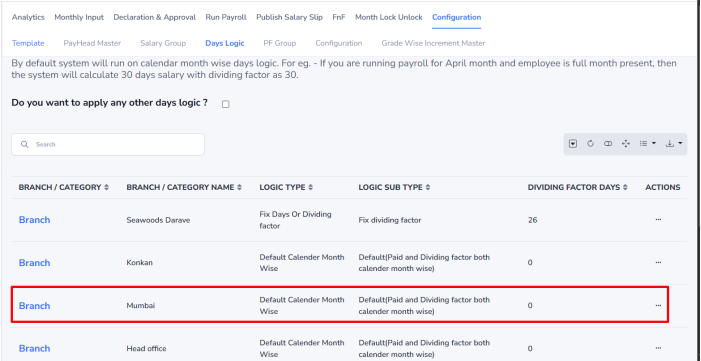
The selected days calculation method will be used during payroll processing for employees belonging to that branch or category.