
PF group
A PF (Provident Fund) Group is used to define and manage Provident Fund-related settings for employees. It enables administrators to apply common PF rules and configurations to multiple employees at once, eliminating the need to configure each employee individually.
By using PF Groups, organizations can ensure consistent Provident Fund calculations and simplify payroll administration.
Adding a New PF Group
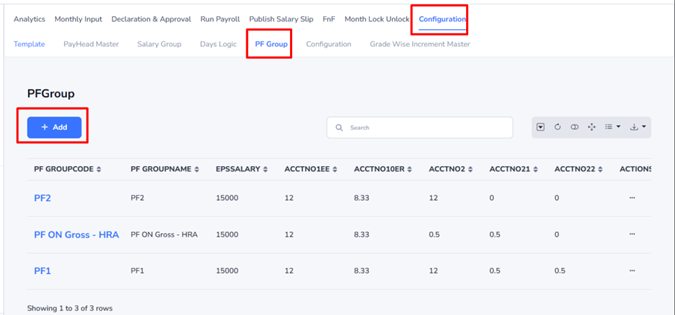
- Navigate to the PF Group section. (Payroll –> Configuration –> PF Group)
- Click the Add button.
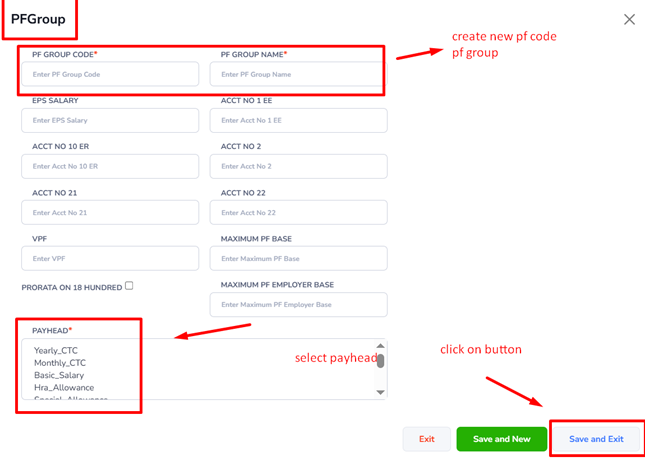
- Enter the required PF Group details.
- Configure the Provident Fund settings as per organizational requirements.
- Click Save to create the PF Group.
Assigning Employees to a PF Group
Once a PF Group has been created and configured:
- Open the employee record. (Official –> Statutory –> Click on PF group)
- Select the appropriate PF Group from the available list.
- Save the employee details.
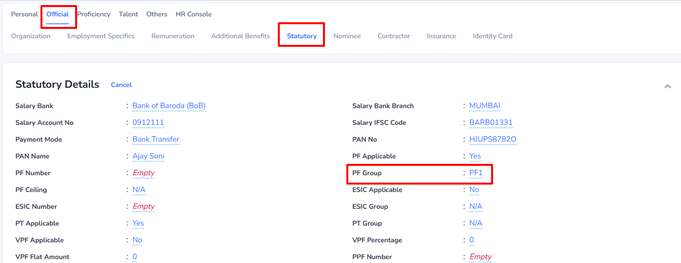
The employee will then inherit the Provident Fund settings defined in the assigned PF Group.