
Additional Variable Pay
This form is used by HR/Payroll Administrators to add extra pay components to an employee’s salary during payroll processing. Any amount entered here is added to the employee’s regular salary and included in the final salary calculation.
Example:
If an employee’s Basic Fixed Pay is ₹15,000 and an Additional Pay of ₹5,000 is added, the total salary payable will be ₹20,000.
Navigation:- Payroll–> Monthly Input –>Additional Variable Pay
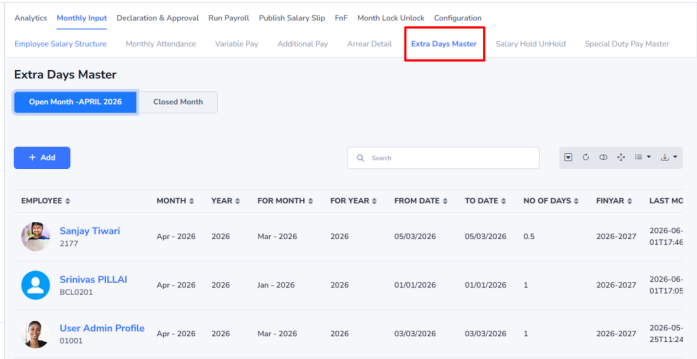
Steps to Add Additional Pay
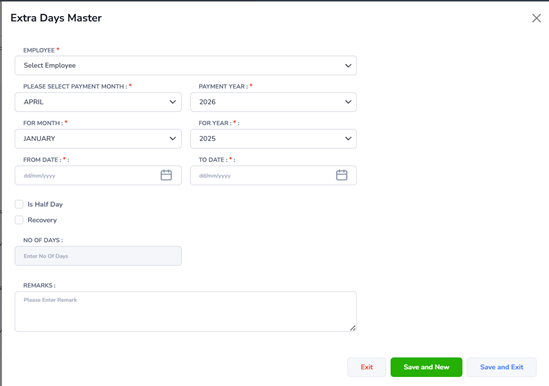
- Click Add to create a new Additional Pay entry.
- The Additional Pay form will open in a pop-up window.
- Enter the required details:
- Employee – Select the employee by name or employee code.
- Month – Select the payment month.
- Year – Select the payment year.
- Pay Head – Select the applicable pay component from the dropdown list.
- Amount/Unit – Enter the amount or unit value.
- Remarks – Enter remarks, if required.
- Click Save to add the amount to the employee’s salary.
Example Entry: Select employee Ajay (EMP0201), choose June 2026, select Special Allowance as the Pay Head, enter ₹5,000, and click Save. The additional amount will be added to the employee’s salary for that month.