
Salary Hold & Unhold
This form is used by HR/Payroll administrators to hold or release (unhold) an employee’s salary during payroll processing.
Navigation:- Payroll–> Monthly Input–>Salary Hold Unhold
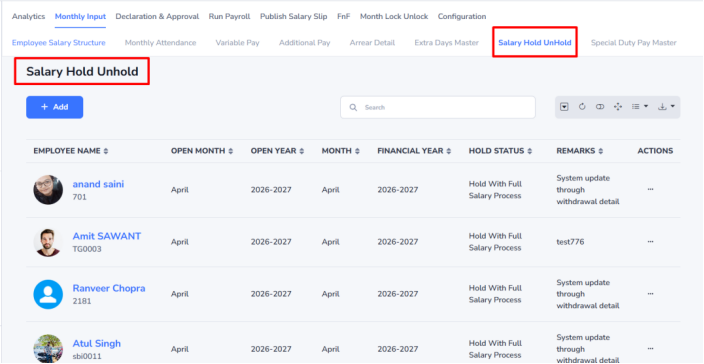
Steps to Update Salary Hold Status
- Click Add to create a new salary hold entry.
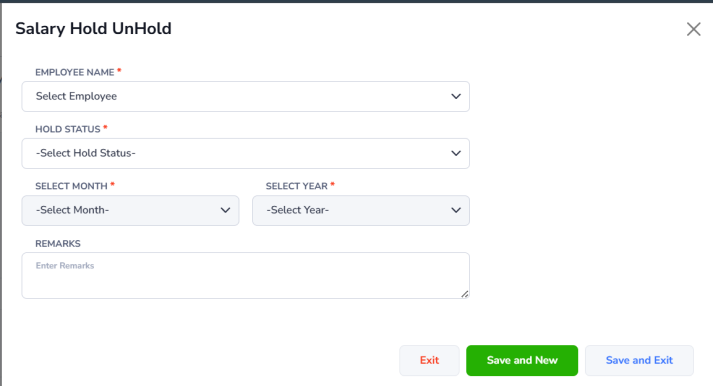
- The Salary Hold form will open in a pop-up window.
- Enter the required details:
- Employee Name – Select the employee by name or employee code.
- Hold Status – Choose the status (e.g., Hold with 0 salary processing).
- Year – Select the year (e.g., 2026).
- Month – Select the month for salary hold/unhold.
- Remarks – Add optional notes, if required.
- Click:
- Save & Exit – To save and close the form.
- Save & New – To save and add another entry.
- Cancel/Exit – To close without saving.
Example :
- If Ajay (EMP0201) is marked as Hold (0 Salary Processing) for June 2026, his salary will not be processed for that month.
- Later, if the status is changed to Unhold/Release, his salary for June 2026 will be processed normally in payroll.