
Extra Days Master
The Extra Days Master form is used by HR and Payroll administrators to add extra payable days or recover salary days for an employee. This ensures accurate salary and payroll calculations.
How to Add an Extra Days Entry
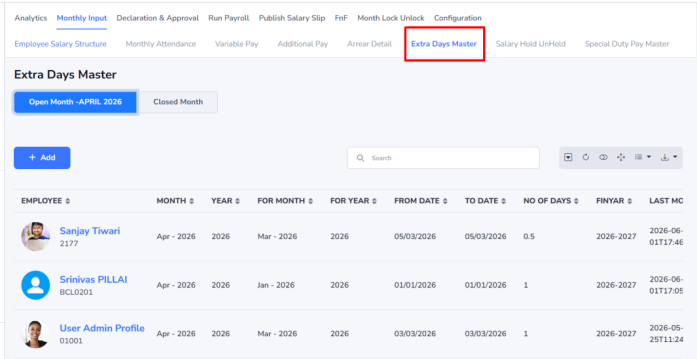
Step 1: Open the Form (Navigation:- Payroll–> Monthly Input –>Extra Days Master)
- Click Add.
- The Extra Days Master window will open.
Step 2: Enter Employee Details
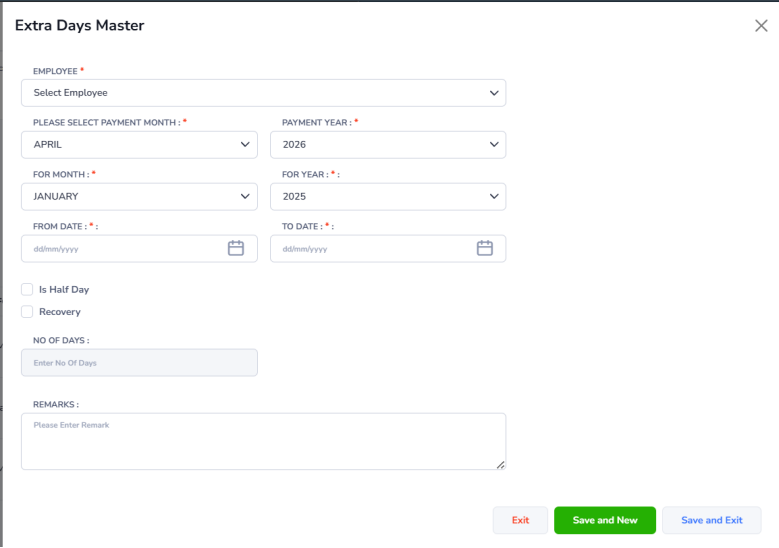
| Field | Description |
|---|---|
| Employee | Select the employee using their name or employee code. |
| Financial Year | Select the financial year in which the payment or recovery will be processed (e.g., 2026–2027). |
| Payment Month | Select the month in which the adjustment will be paid or recovered (e.g., April). |
| Payment FinYear | Select the financial year for the payment month (e.g., 2026–2027). |
| For Month | Select the month for which the arrears or recovery applies. |
| For FinYear | Select the financial year for which the arrears or recovery applies (e.g., 2026–2027). |
| From Date | Select the start date for the arrears or recovery period. |
| To Date | Select the end date for the arrears or recovery period. |
| Is Full Day | Select Yes for a full-day adjustment or No for a half-day adjustment. |
| Is Recovery | Select Yes if salary needs to be recovered. Select No if salary needs to be paid. |
| No. of Days | The system automatically calculates the number of days based on the selected dates. |
Step 3: Save the Record
- Click Save & Exit to save the entry and close the form.
- Click Save & New to save the current entry and add another employee’s details.
- Click Exit to close the form without saving.
Example 1: Previous Month Arrears
The employee was not paid for 3 days in April 2026. These days will be paid in the May 2026 payroll.
- Payment Month: May 2026
- For Month: April 2026
- From Date: 28-Apr-2026
- To Date: 30-Apr-2026
- Is Full Day: Yes
- Is Recovery: No
Result: Employee receives payment for 3 missed days in the May payroll.
Example 2: Salary Recovery
The employee was mistakenly paid for 2 extra days in April 2026. The salary will be recovered in the May 2026 payroll.
- Payment Month: May 2026
- For Month: April 2026
- From Date: 10-Apr-2026
- To Date: 11-Apr-2026
- Is Full Day: Yes
- Is Recovery: Yes
Result: Salary for 2 days will be deducted from the employee May payroll.