
Leave Period
Just as the Financial Year or Appraisal Year is defined, it is also necessary to define a Leave Period for each Leave Group. This can be done using the Leave Period Configuration menu. You can create multiple leave periods for the same Leave Group; however, only one leave period can be active at a time. A leave period must be activated to be applicable and functional for that Leave Group.

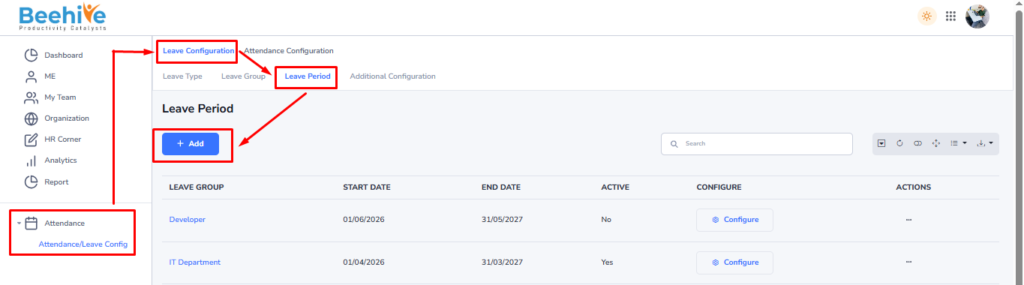
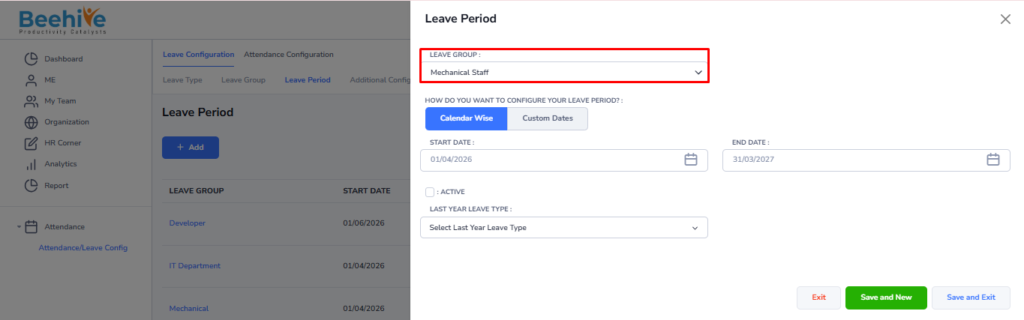
There are two options for configuring leave periods –
– Calendar Wise: The leave period follows the standard Financial Year format (April to March).
– Custom Wise: HR can define a custom leave period based on the company’s policies (e.g., January to December).
Ensure the appropriate leave period is selected and activated to maintain proper leave tracking for employees.
Note – Employees can raise leave applications only for the Leave Period marked as Active. If the Leave Period is inactive, the system will restrict employees from applying for leave under that leave period.
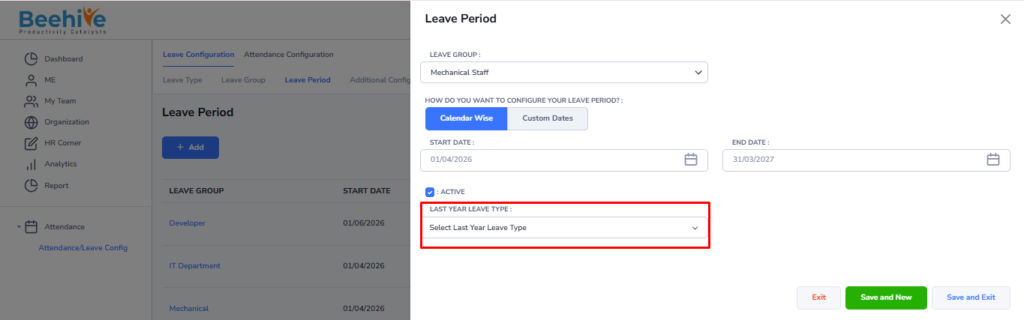
Leave LeaveType functionality allows HR to carry forward the leave rules defined for the current leave period into the next leave period. It helps ensure continuity and consistency in leave policy settings across periods without the need for manual reconfiguration