
Weeklyoff Template Creation
The Weekly Off Template page is used to create and manage weekly off patterns for employees within the organization.
Using this configuration, HR/Admin can define –
– Weekly off schedules
– Single weekly offs
– Multiple weekly offs
– Rotational off patterns
These templates can later be assigned to employees through the WeekOff Assignment configuration.
Navigation Path –
Go to -> Module Box ->Attendance/Leave Config ->→ Attendance Configuration ->WeeklyOff Template → Add Button
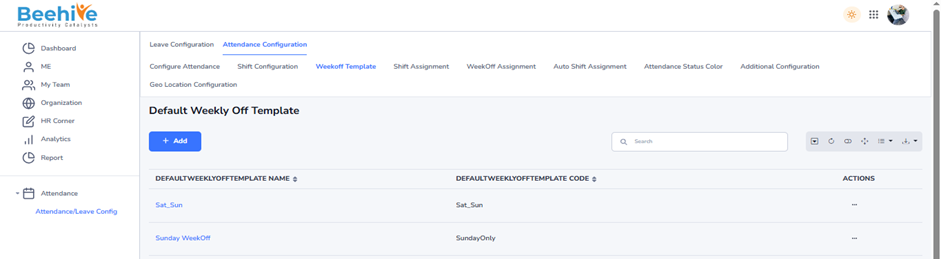
Purpose of Weekly Off Template –
The Weekly Off Template helps organizations –
– Define employee weekly off structures
– Configure standard weekly holidays
– Manage different department-wise off patterns
– Support rotational weekly off policies
– Automate attendance and payroll calculations
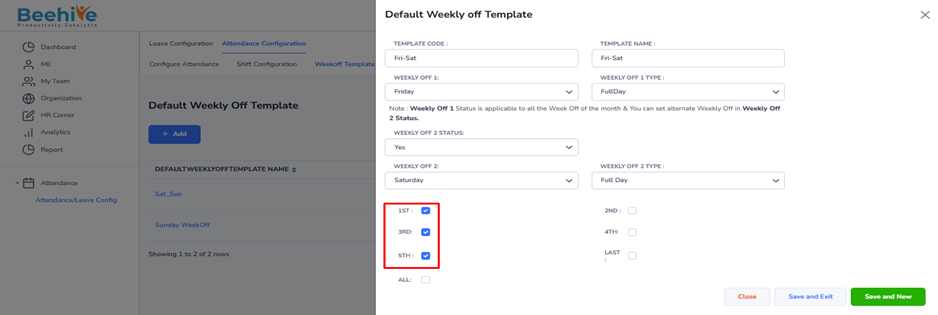
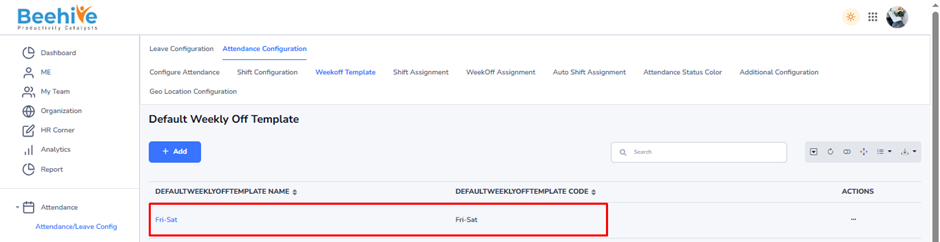
Template Code – Short code for weekly off
Template Name – Weekly off name
Weekly Off 1 – First weekly off day
Weekly Off 1 Type – Full Day or Half Day weekly off
Weekly Off 2 Status – Enable second weekly off
Weekly Off 2 – Second weekly off day
Weekly Off 2 Type – Full Day or Half Day
1st / 2nd / 3rd / 4th / 5th / Last – Select which week off should apply
All – Weekly off applies every week