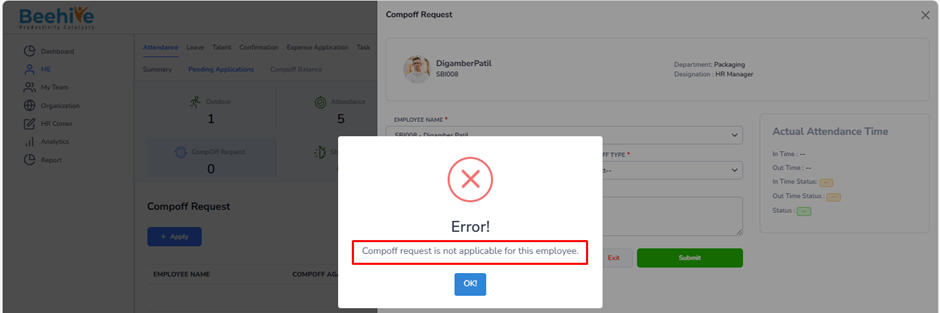
How to restrict employee to raise Compoff Request Application?
This option allows the organization to make the CompOff Request process mandatory before employees can apply for a CompOff leave.
When this setting is enabled, employees must first raise a CompOff request for the extra working day and get it approved. After approval, they will be allowed to apply for the CompOff leave against that approved request. This helps organizations track extra working days properly and ensures that CompOff leaves are granted only after manager approval.
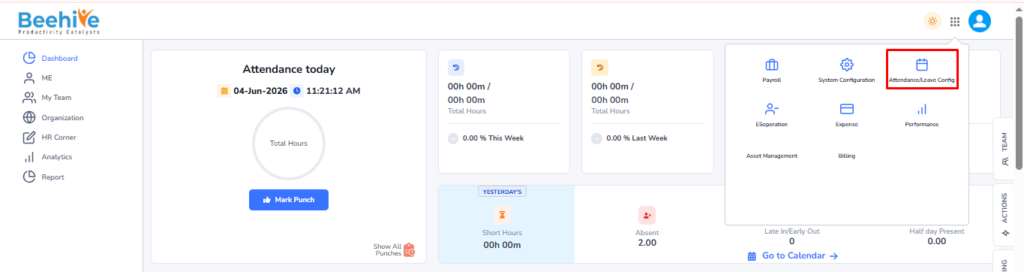
Navigation –
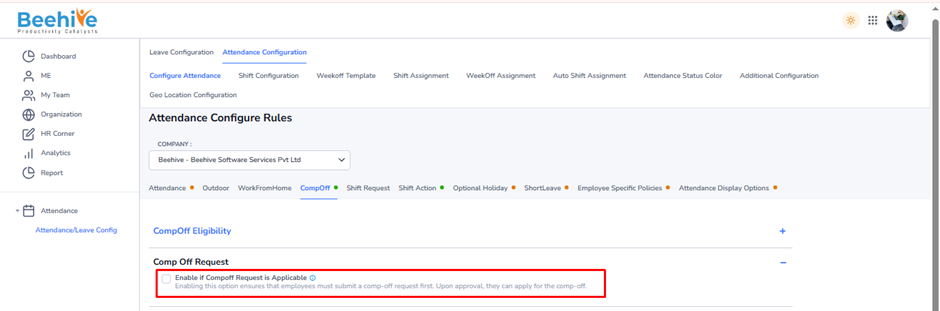
Login → Module Box → Attendance/Leave Config → Attendance Configuration → Configure Attendance → Compoff
How It Works –
– Enable the checkbox “Enable if CompOff Request is Applicable”.
– Employees must first submit a CompOff request.
– Manager or Admin approves the request.
– After approval, employees can apply for CompOff leave.
Note –
If the CompOff Request configuration is disabled, employees are not required to raise CompOff requests. The system will automatically credit eligible CompOff balance to employees on a daily basis.
If the “Enable if CompOff Request is Applicable” configuration is not enabled, the system will restrict employees from raising CompOff Request applications. Employees will not be able to submit CompOff requests unless this configuration is made applicable by the organization.