
Shift Creation
The Shift Configuration page is used to create and manage employee shift timings within the attendance management system. HR or administrators can define different shift schedules such as General Shift, Night Shift, Flexible Shift, and Rotational Shift based on organizational requirements.
Using this configuration, organizations can control employee In Time, Out Time, shift type, and attendance calculations accurately.
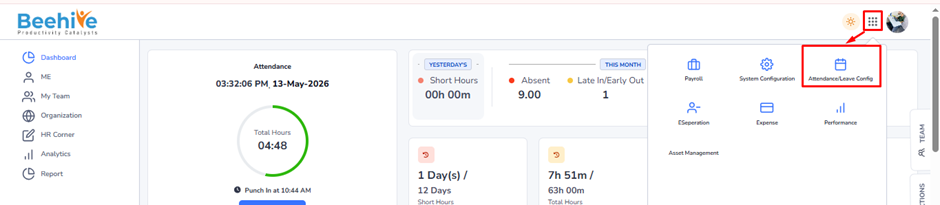
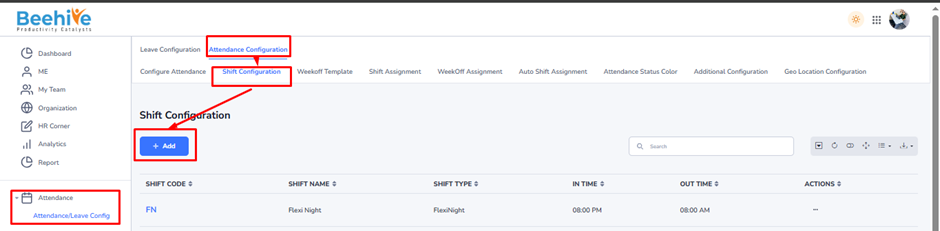
Navigation Path –
Go to -> Module Box ->Attendance/Leave Config ->→ Attendance Configuration ->Shift Configuration → Add Button
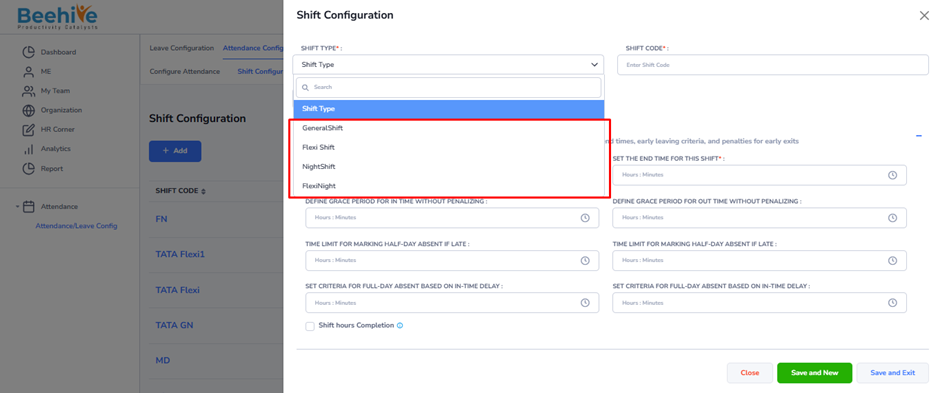
Shift Types –
1. General Shift
2. Flexi Shift
3. Night Shift
4. Flexi Night
1. General Shift –
Purpose – General Shift is used for employees who work during fixed and regular office hours. This is the standard shift used in most organizations for daily operations.
This shift helps –
– Maintain fixed working timings.
– Simplify attendance tracking.
– Ensure standard office operations.
Example –
Shift Timing: 9:00 AM to 6:00 PM
Commonly Used For –
– HR Department
– Finance Teams
– IT Employees
– Administrative Staff
2. Flexi Shift –
Purpose – Flexi Shift allows employees to choose their login and logout timings within a defined flexible time range while completing required working hours.
This shift helps –
– Improve employee flexibility.
– Support work-life balance.
– Increase employee productivity.
Example –
Shift Timing: 9:00 AM to 9:00 PM
Required Working Hours: 9 Hours (Depending on Shift Configuration)
If an employee logs in at 10:00 AM, the logout time will be adjusted accordingly.
Commonly Used For –
– IT Companies
– Software Development Teams
– Hybrid Work Environments
– Creative Teams
3. Night Shift –
Purpose – Night Shift is used for employees working during overnight hours or organizations operating 24×7.
This shift helps –
– Maintain continuous business operations.
– Support international clients and processes.
– Manage overnight production or support activities.
Example –
Shift Timing: 10:00 PM to 7:00 AM
Commonly Used For –
– BPO/KPO Companies
– Customer Support Centers
– Hospitals
– Security Services
– Manufacturing Plants
4. Flexi Night Shift –
Purpose – Flexi Night Shift combines flexible timing with night working hours. Employees can start their night shift within a defined time range while completing the required working duration.
This shift helps –
– Provide flexibility in overnight operations.
– Manage employee convenience during night working hours.
– Improve workforce management for global operations.
Example –
Shift Timing: 8:00 PM to 8:00 AM
Required Working Hours: 9 Hours (Depending on Shift Configuration)
If an employee logs in at 9:15 PM, the logout time will be calculated based on the configured working hours.
Commonly Used For –
– International Support Teams
– Global IT Operations
– BPO Night Processes
– Remote Support Teams